How to model your own detailed 3D avatar using some photos of yourself with least modeling effort us
- Jayanth K

- Aug 12, 2020
- 7 min read
Recovering highly detailed 3D geometry from a some 2D image is one of the most challenging tasks in human digitization with computer vision, which has a wide array of applications to the digital media industry. This has been an area of research that I have always been fascinated by. There have been many advancements in this field and today, First I like to share with you some of the exciting and excellent papers which i tried, and wanted to delight you with some small AI-powered tools which can make human digitization a walk in the park.
Paper 1: Large Pose 3D Face Reconstruction from a Single Image via Direct Volumetric CNN Regression (8 Sep 2017) https://arxiv.org/pdf/1703.07834.pdf

3D Face from a single Photo
“3D face reconstruction is a fundamental computer vision problem of extraordinary difficulty.” You usually need multiple pictures of the same face from different angles in order to map every contour. But, by feeding a bunch of photographs and corresponding 3D models into a neural network, the researchers were able to teach an AI system how to quickly extrapolate the shape of a face from a single photo.
This paper was published on 8 Sep 2017. The next paper which you are about to see released this year, achieved full 3D human shape estimation with detailed clothing information.
Paper 2:
PIFuHD: Multi-Level Pixel-Aligned Implicit Function for High-Resolution 3D Human Digitization https://arxiv.org/pdf/2004.00452.pdf
Try it yourself: https://shunsukesaito.github.io/PIFUHD/
This paper was published at this year’s 2020 CVPR conference. In the wake of making 3D characters fast and easy the Facebook Al research, Facebook reality labs and the University of Southern California has developed an amazing Image-based 3D human shape estimation which is driven by the significant improvement in representation power afforded by deep neural networks.
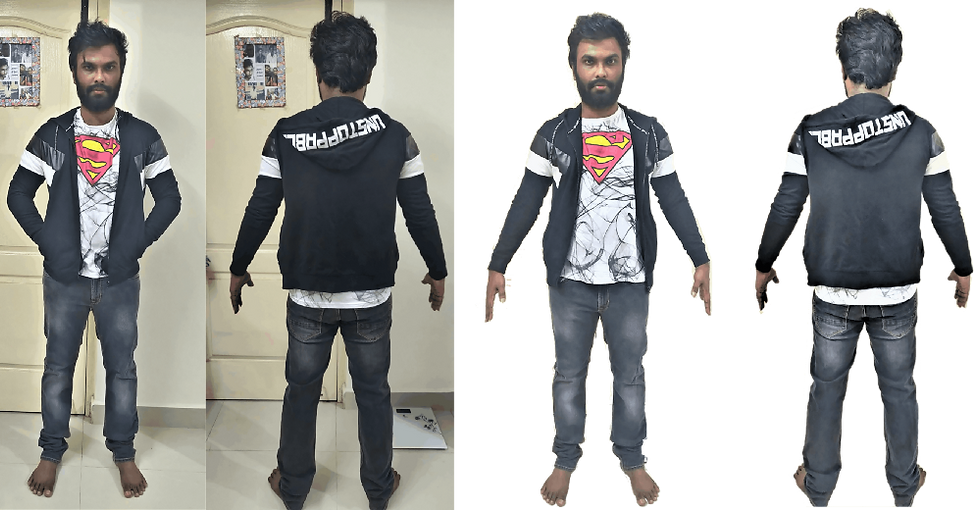
Image input for 3D conversion


Multiple attempts for finding the best possible output
After few tries of input pics with different clothing, I found out that the algorithm captures clothing and body proportions nicely than capturing face, finger and toe information. So if you are trying this out yourself make sure you click your pic in well lit place and if you want to animate your model later stand in T-pose, as you might face issues in rigging if you held your had close to your body.
After few tries of input pics with different clothing, i found out that the algorithm captures clothing and body proportions nicely than capturing face, finger and toe information. So if you are trying this out yourself make sure you click your pic in well lit place and if you want to animate your model later stand in T-pose, as you might face issues in rigging if you held your had close to your body.

Just from single image a full 3D model with clothing details can be generated
I think this is a wonderful technique which has many direct applications to gaming. Previously you would either need 3D modelling skills or manual customization work to create virtual game characters, making it hard for an end user to do this. But after we perfect these kind of AI tools which automatically create highly detailed 3D models from single 2D image anyone with the camera will be able to create their own personalized highly detailed playable characters in games and I think this will make character customization to a whole new level in the future.
After generating the 3D model using the above method i got a basic shape of my body with my clothing details… But this method dint have high details of my face, hands and my toes…

Textured my model on Blender using simple front and back images
Next i imported the generated model in blender. Then i unwrapped the model as in view and started applying texture using the front and back images which we gave as inputs before for generating the model and sculpted the uneven edges of the cloth mesh using the sculpt tab in blender.
The previously generated model dint have much facial features. For my model to look like me the most important thing is to capture my facial features properly.. so i had to discard the head part on the model and go for some other alternative method.
Keentools FaceBuilder addon
After that, i came across an addon in blender called keentools FaceBuilder. It helped with building 3D models of human faces and heads using a couple of photographs. With FaceBuilder you don’t need to be an experienced 3D modeller to create a quality 3D model with clean topology.

You start with getting a few photos with neutral face expression from different angles and then place a model on each of them to build a head or face model.
In face builder tool, i overlaid a facial mesh over my face image… The trick is to drag the edges of prominent features of the mesh like eye edges, nose point and place it over my pics eye edge and nose point and so on…

Final Textured output by Keentools faceBuilder
After that, the tool gives an option to bake the texture of the face. After baking ,it generates a texture image for the modeled face created. I was impressed with the 3D face output. It looked 80 to 90 percent like me…
After that, the tool gives an option to bake the texture of the face. After baking ,it generates a texture image for the modeled face created. I was impressed with the 3D face output.It looked 80 to 90 percent like me…
I followed the below tutorial for generating perfect face from keentools facebuilder addon for blender
Reference links: 1) Create your face(Blender tutorial) https://youtu.be/sf88UeC7LmE
There is another tool for detecting Face on a video… If you are interested in learning Keen-tools take a look in Face-tracker by Keentools,

Creating Hair Details for my model
Applying default Animation's in Maximo to my model nerate my hair manually in blender.
So, by using hair particles in blender, i added hair strands and combed it on to the head. And created some nice skin shader for my facial skin.

Final Blender Head Output gif
But my head with hair mesh is high poly.
Initially the head model generated by keen tools is high poly. And the hair strands which i generated from hair particles was taking too much polygons which made the file size bigger to about 50 MB. Which is nowhere close to a game ready asset.
For a 3D asset to run properly in game app, the model must have less polygons… the more the polygons in the mesh the more the app will have to stress the CPU.
But less polygons means we lose details of the model.
So i found some tutorials for reducing the hair particles polygon mesh. Found a good one which was clear.
Link: How to convert hair particles from mesh and curve Blender 2.8 https://youtu.be/M-PFEAKSxHc
By following this i was able to reduce the size from 50 +mb to 11mb. But i could reduce it up to 5 to 10 MB without loosing much details.
Then i combined my head and body 3D models using a simple join command in blender and applied skin shader for my face by seeing the following tutorial
Link: Blender tutorial — How to Make Skin Shader https://youtu.be/B3TnEMoNIr4

My Final Model Output from Blender
I wear glasses without it, it looked lot less like me. So i downloaded a free glass asset and attached it with my model mesh.
Then for creating an awesome output, i imported the final model into unity for taking a rendered output and to check if my model is game ready.

My Final Unity Output
The final output came to my satisfaction…
For Rigging my model I uploaded the finished model into MAXIMO autorigging software.

Maximo Auto Rigger
Maximo asked me to point out the models chin, wrists, elbows, knees and groin. After that it automatically rigged my models full human skeleton and got it ready to animate in just 2 to 5 minutes of time.


Applying default Aniamtions in Maximo to my model
After that i had to select from a list of animations from the left and instantly it animates my model on the right.
Maximo lets you to download your animated model in FBX format.
Animated Model unity Output


Unity Render
After that I imported the downloaded model into unity and here are the animated models output.
Augmented reality
After that i imported my animated models into Glitch and used Model/Scene Viewer to create a AR Web app which anyone with a link can open in their browser and experience my 3D avatar in Augmented reality.
For the models to be displayed in android and IOS, i had to convert all my models to GLTF and USDZ respectively.


Free WebAR possible through google's ModelViewer and IOS AR Quicklook
model-viewer web component lets you declaratively add a 3D model to a web page. Support for AR on Android with the addition of the ar attribute. This attribute is built on a new ARCore feature called Scene Viewer, an external app for viewing 3D models.
IOS use AR Quick Look to display USDZ files of virtual objects in 3D or AR on iPhone and iPad. You can embed Quick Look views in your apps and websites to let users see incredibly detailed object renderings in a real-world surrounding with support for audio playback.

Reality composer creates interactions for AR Quicklook.
Using Reality Composer app for IOS, we can create .reality files from USDZ to create interactions for AR Quicklook. . reality file is recognized by AR quicklook.
To do list…
Next course of action is rigging the face of this model to give facial reactions.
There are number of ways to do this but i found the following one is easier…

Blender has an auto rigging system
Blender has an auto rigging system with face rig in it, so we can use the default rig system and rig my models face.
A simple tutorial link for Autorig in blender…
Link: https://youtu.be/2qwdIYaTPBM
Then for animating the facial reactions there is an interesting technique. By 3D motion capture using the latest iPhone camera, we can capture our facial reactions real time and transfer it real time to our model…

3D motion capture using the latest iPhone camera
Link on list of ways to capture animating the facial model.
Or even we can animate our speech just by giving text as input by this method..
Conclusion
We are living in exciting times… where artificial intelligence is taking over most of the workflows in 3D modelling and animation. Can’t wait to see how the industry is going to leverage this amazing new advancements for creating wonderful games…
About myself…
VR/AR dev, #futurist, Unity Game developer, Tech analyst, VR enthusiast, AI enthusiast, #badminton lover,# chess lover,# video games lover…
Follow me on Twitter: Check out Jayanth (@jayanthvoyager): https://twitter.com/jayanthvoyager?s=08
My Website:
Linkedin: https://www.linkedin.com/in/jayanth-k-126935110


Comments